

Article
There is a pleasingly practical loop behind this post: I have been using Traverse to plan a series of articles about Traverse.
The result is a single outline called Blog post ideas. It contains the structure of the articles already in progress, along with ideas for future posts. Each article has a proposed heading, section headings and the key points that should be covered. Dates and Tags add a small amount of editorial information, while Notes explain the purpose of selected sections without making their titles unwieldy.
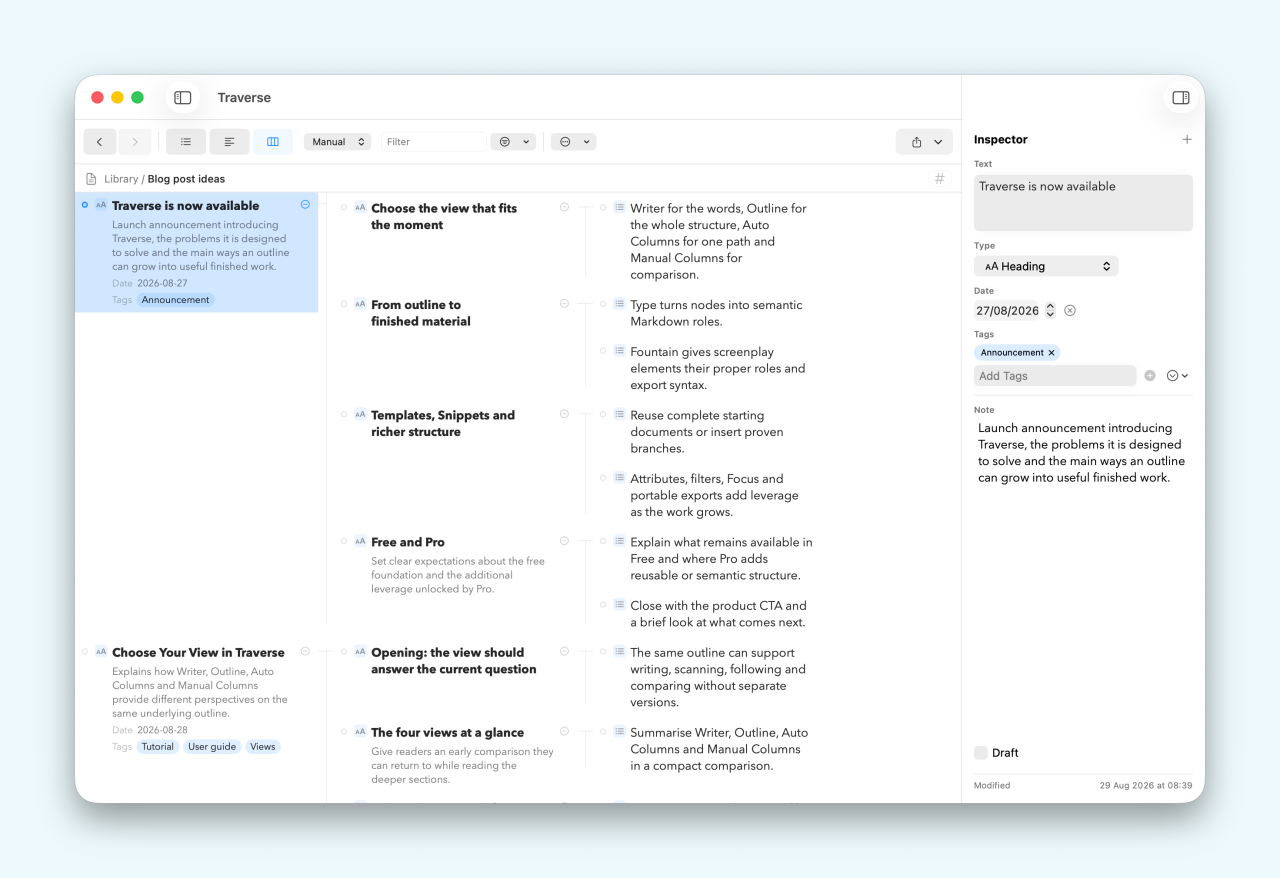
It is not a specially constructed demo. It is a real working file, and you can download a copy to explore in Traverse, adapt for your own writing or simply use as an example of how much a straightforward outline can do.
Example outline
Download the Blog post ideas OPML file and open it in Traverse.
What is in the outline?
At the top level, the file contains thirteen article ideas. Some correspond to posts that have already been drafted, including guides to Type, Fountain, Attributes, Templates and Snippets, and Traverse's different views. Others are possible future articles about getting started, project planning, research, keyboard-first working, Focus and filters, portable files and Apple Intelligence.
Each post is a branch. Beneath its title are the intended sections, and beneath those sections are the points that the finished article should make. In its simplest form, the pattern looks like this:
Article title
    Opening
        The problem or opportunity to introduce
        The promise of the article
    What the feature does
        Essential ideas to explain
    When to use it
        Useful situations and examples
    Tutorial
        The practical steps to demonstrate
    Conclusion
        The main idea to leave with the reader
If you want to try this structure yourself, you can copy and paste the text above straight into Traverse. Its indentation will become the starting hierarchy, ready for you to rename and expand.
The downloadable file goes further than indentation. Its article and section titles have the Heading Type, while the supporting points use the Bullet Type. That gives the nodes a semantic role: Traverse knows which items are document headings and which are list items when the time comes to create a Markdown document.
Why keep several posts together?
Keeping the whole series in one outline provides an editorial map. I can see whether an idea belongs in an existing article or deserves a post of its own. I can spot gaps, repeated sections and useful links between subjects. A future article can begin as a single heading, then acquire sections and supporting points only when the idea is ready to develop.
The file opens in Manual Columns, which is particularly helpful here. Several article branches can remain visible at once, making it easy to compare their shape or move an idea to a better home. I can switch to Outline view for a compact overview or Writer view when a skeleton begins turning into prose. The underlying outline does not change when the view does.
This is an important part of the example. Traverse does not require every idea to have the same level of detail. A short possibility and a thoroughly planned article can sit beside one another without either becoming awkward.
A little metadata, where it helps
The outline includes two custom attributes: Date and Tags.
Date records or plans the relevant publication date. Tags describe the subject or role of a post with values such as Tutorial, Beginner, Markdown, Research, Workflow and Export. They add useful context without forcing that information into the article title or into another tracking system.
The built-in Note attribute has a different job. Each top-level article idea has a short summary describing what the post is intended to achieve. Selected section headings also have a Note where a reminder about that section's purpose is useful. For example, a tutorial section might note that its worked example should remain small enough to complete in one sitting.
Those Notes are guidance for the writer, not part of the heading itself. They demonstrate a useful distinction:
- The node text says what the section is called.
- Its place in the hierarchy says where it belongs.
- Type says how it should behave in a document.
- Date and Tags provide reusable editorial metadata.
- Note preserves context, intent or a reminder for whoever writes it.
You can use only the layers that help. The outline remains readable even if you ignore every attribute and concentrate on its branches.
Work on one article at a time
An outline containing an entire series is valuable when planning, but it does not mean the whole series must remain on screen while writing.
Select any top-level article and choose Outline → Focus on Selection, or press Command-F. Traverse temporarily makes that branch the workspace. The other post ideas disappear from the working view, while the breadcrumb retains the context and makes it easy to return to the complete outline.
This turns one branch of a larger editorial plan into something that feels like a self-contained document. Switch to Writer view and work through its heading, subsections and key points without the other articles competing for attention. When you want the wider map again, choose Clear Focus or press Shift-Command-F.
Focus changes what you see, not the structure stored in the OPML file. The article has not been copied into a separate document, and changes made while focused are changes to the original branch. Focus mode is a Traverse Pro feature.
Export only the article you need
Focus is also useful at the end of the planning stage. While a post is focused, Traverse uses that branch as the scope for export.
Choose File → Export → Markdown Document… and the exported file contains the focused article rather than all thirteen post ideas. Because the example uses Type, the article title and subsection nodes become Markdown headings and the key points become bullets. The result is a useful writing scaffold, not a dump of the whole editorial outline.
You can then finish the post wherever you prefer: a Markdown editor, a text editor, a Git repository or the publishing system for your website. This workflow lets Traverse remain the place where the series is planned and structured without insisting that it must also be the final publishing environment.
The same principle applies to the other export formats. Focus a branch when you want to share, archive or move only that part of a larger outline.
Try the workflow
- Download Blog post ideas.opml using the button above.
- In Traverse, choose File → Import → OPML… and select the downloaded file. Traverse brings an editable copy into your document library.
- Browse the top-level article ideas in Manual Columns or switch to Outline view for a compact list.
- Select an article and inspect its Date, Tags and Note. Open a few subsection headings to see where a Note has been used to record its purpose.
- Expand the article to see the relationship between its headings and key points. Turn on visible attributes if you want their roles and values to remain in view while browsing.
- Select the article title and enter Focus mode. Switch to Writer view if you want to develop its points into prose.
- While still focused, export a Markdown Document and open it in your preferred editor. Only the selected post and its descendants will be included.
- Clear Focus to return to the complete editorial map.
You can safely rename, move, duplicate or delete anything in your imported copy. Try adding a post of your own, give it a summary Note, assign a Date and a few Tags, then build its sections beneath it.
Simple structure, considerable leverage
This example is deliberately ordinary. It is a collection of article headings, subheadings and bullet points. There is no complex database and no elaborate project-management system.
Yet the hierarchy gives the ideas shape. Types prepare that shape for document export. Notes retain the thinking behind it. Date and Tags add just enough metadata to organise the series. Views make the same material useful for overview, comparison and writing. Focus turns one branch into a quiet workspace, and scoped export hands only that branch to the next tool.
Most importantly, the source remains OPML: a portable, human-readable format that can move between compatible tools. Traverse adds power around the outline without trapping the outline inside a proprietary system.
That is the kind of work Traverse is designed for. Start with a simple structure. Add meaning only where it earns its place. See the whole project when that is useful, then narrow the workspace to the one thing you want to finish.
Traverse
Plan the whole body of work, focus on one branch and carry it forward in an open format.